STEP 01
Bring a piece.
Paste a product link or add a clothing photo. If a store blocks imports, use a clear screenshot.
Your phone. Your fitting room.
Found a piece you love? Add its link or photo, review the garment image, and explore a moving preview of you wearing it. Save the look before you decide.
$14.99 once · 5 live sessions · No subscription
Bring your findsA store link or clothing photo
Explore the lookA live preview as you move
Take another lookSave a photo or short replay
A real example, up close
Here’s the reference shirt and a frame from our recorded test. Watch the video above to see the preview move.
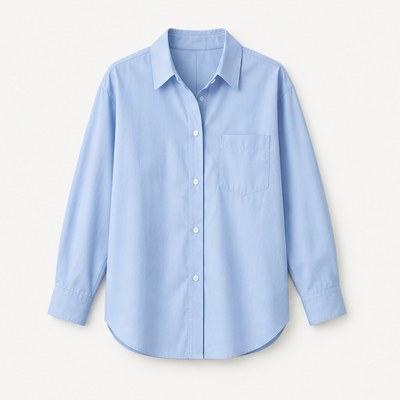
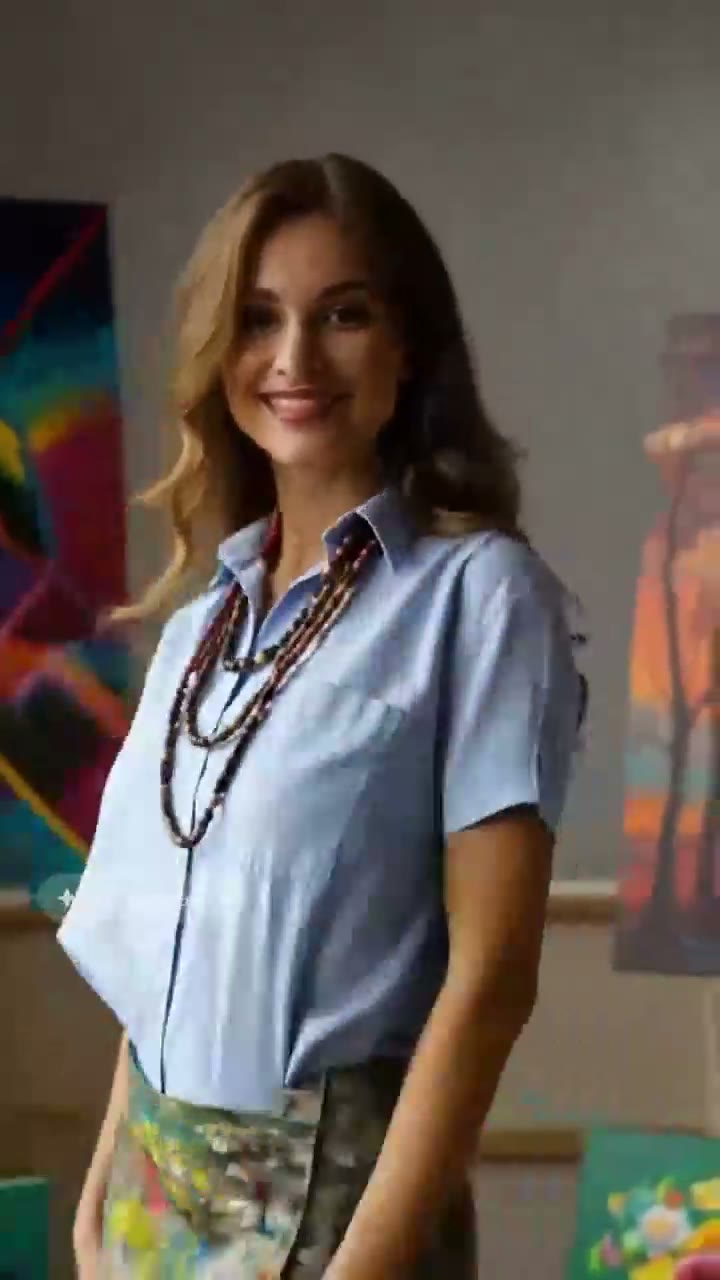 Generated preview
Generated previews can change colors, garment details and proportions. This example doesn’t guarantee the same result for every piece or person.
A little less “what if?”
Three simple steps. You choose when your camera and live preview start.
Paste a product link or add a clothing photo. If a store blocks imports, use a clear screenshot.
Review a clean image of just the garment. Check that its shape, coverage, color and details match.
Set down your phone and start your 30-second live session. Save a photo or short replay to revisit.
Start with a clear, fully opaque garment. Intimates, sheer pieces and lace camisoles aren’t currently supported. Check your photo and camera setup before a paid session.
See what’s in the passThe second look is on you
It’s easier to see the outfit when you’re away from the phone. Save a short replay, then review it up close.
Your next wardrobe possibility
Start with the clothes you’ve been thinking about. Explore the style, save a look and choose for yourself.
One payment. No subscription.
Mira Shopping Pass
A little room to try something new.
Purchases are paused while we finish testing. You can explore Mira without paying.
If your first look isn’t useful, request a full refund of your first pass within 7 days of purchase, after at most one used session and before using another. You may also request before any session is used. Refunding cancels unused sessions. Full conditions
Generated previews don’t predict fit or size. Any applicable taxes and the final total appear before payment. A network interruption can end a preview early.
Before you step inside
Still wondering about something?
We’re here to help.
No. Mira runs in your phone’s browser, starting with iPhone Safari. It needs a secure connection and your camera permission. Open Mira in Safari if you arrive through Instagram or Facebook, and check your camera setup before a paid try-on.
Use a clear photo of a fully opaque garment. Intimates, sheer pieces and lace camisoles aren’t currently supported. Review the garment-only image before continuing. A reviewed photo helps prepare your preview, but doesn’t guarantee that every item will render successfully.
Links work when the store makes a usable image available. Some stores block imports. If a link doesn’t work, upload a clear clothing photo or screenshot. Check the exact piece and color before trying it on.
No. Mira is a computer-generated style visualization, not a body-measurement or size-recommendation tool. It can change details, colors and proportions. Check the retailer’s measurements and return policy when choosing a size.
One live session includes 30 seconds of live viewing. Setup and connection time don’t use your viewing time. A network interruption can still end the preview early. You can save a photo or short replay; rewatching it doesn’t start another paid session.
Request a full refund of your first Shopping Pass within 7 days of purchase, after at most one used session and before using another. You can also request before using any session. The refund cancels that pass’s unused sessions without a credit penalty on your next purchase. Open Plan & billing in Mira to check eligibility and request. Read the conditions.
No. The $14.99 Shopping Pass is a one-time purchase. There’s no subscription or automatic top-up. You choose whether to buy another pass.
Camera setup stays on your phone. Starting live try-on sends your camera video and clothing image to Decart, the provider that generates your preview. Optional photo preparation also sends the clothing image to Decart when you choose that option. Review the separate data-use notice before you start, including whether the provider may use inputs and outputs for model training.
Saved looks stay in your browser on your device. They don’t sync between devices and can disappear if browser data is cleared. Download the looks you want to keep.
$14.99 once · 5 live sessions · No subscription
This page plays a recorded example. It doesn’t open your camera or process your images. In Mira, you choose when camera access and preview generation start. Read the privacy information before sharing a personal image or video.